Production onboarding instructions for property owners, followed by connection behavior, data synchronization, webhook, security, and support guidance.
OwnerRez → ActionLedgerApproved account, property, listing, reservation, communication, inquiry, quote, and related activity data.
ActionLedger → OwnerRezNo business-data writes are performed by default in the current release, even though the production OAuth app is configured for the approved full scope.
WebhooksSupported OwnerRez creates, updates, deletes, test deliveries, and authorization revocation are received for configured event types.
This guide explains the owner-facing production setup and the ongoing behavior of the OwnerRez integration. OwnerRez remains the property-management source of truth; ActionLedger imports supported activity into its owner-review and evidence workflow.
This article is structured for an OwnerRez support-center listing and follows the same general format as the StayFi integration article.
Production owner onboarding
Connect OwnerRez to ActionLedger in four stages. Most owners finish in about 10–15 minutes.
Stage 1Owner details
Stage 2Connect OwnerRez
Stage 3Review properties
Stage 4Billing
Before you begin
Sign in to the OwnerRez account that manages the properties you want to connect.
Keep this guide open in a separate browser tab.
Have a payment method available for the final billing step.
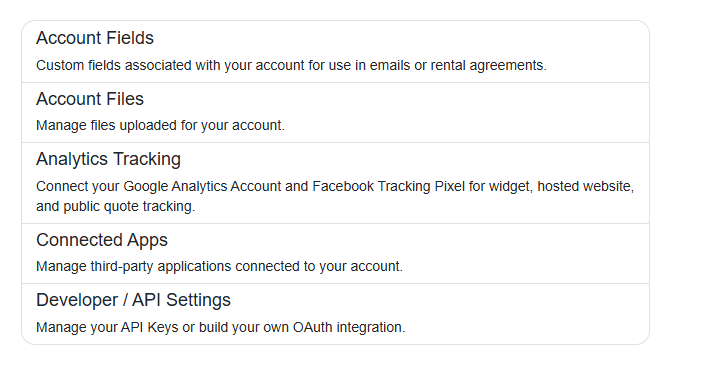
1Open Developer / API Settings
In OwnerRez, open Settings. Under Advanced Tools, select Developer / API Settings.
OwnerRez Settings → Advanced Tools → Developer / API Settings.
2Create an OAuth app
In the OAuth Apps section, select Create OAuth App.
Create a dedicated OAuth application for ActionLedger.
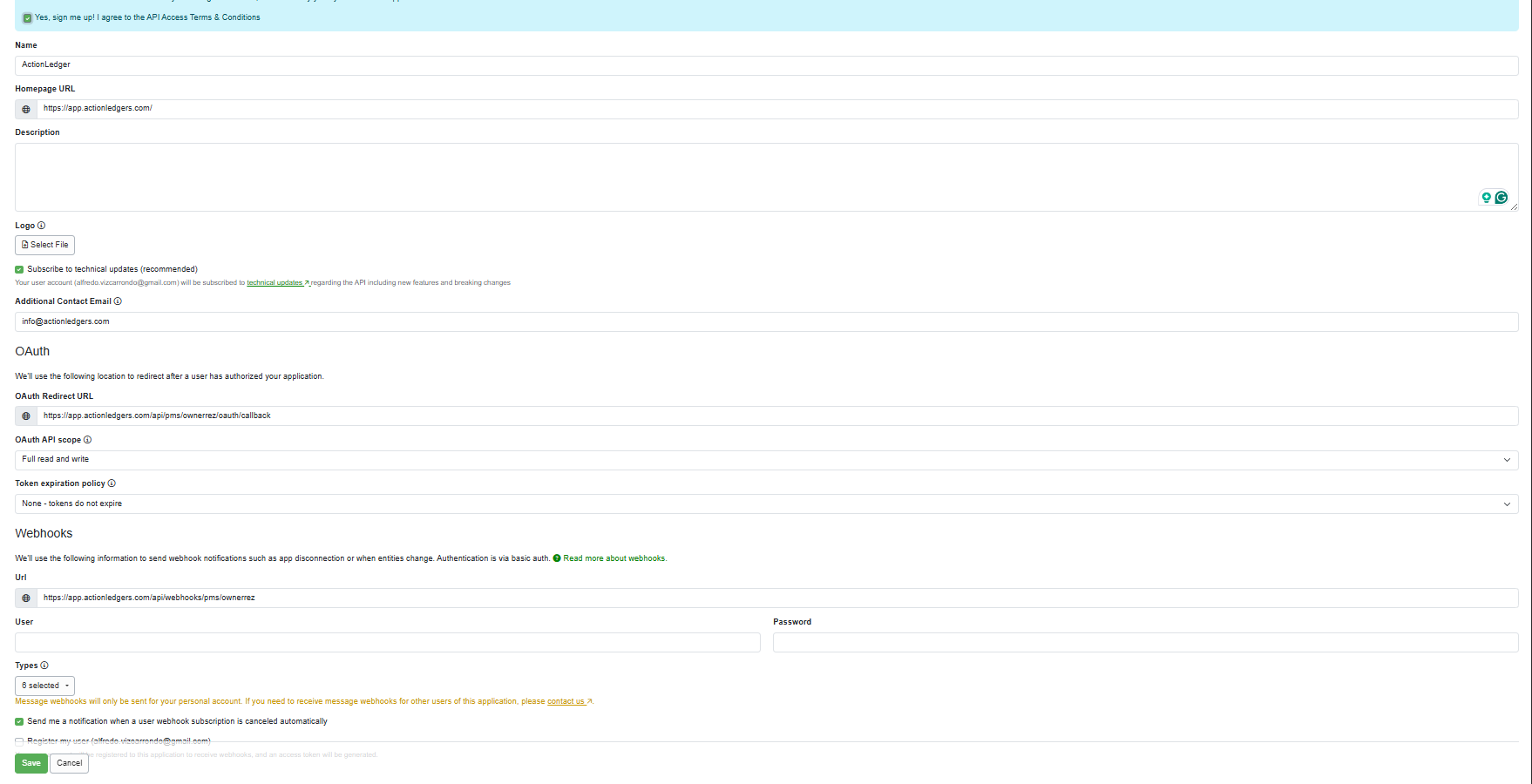
3Configure the OAuth app
Populate the OwnerRez form with these production values, select the six webhook types, and then select Save.
Where the username and password come from: you create both values in the Webhooks section of this OwnerRez OAuth app. They are not supplied by OwnerRez and they are not the credentials you use to sign in to OwnerRez. Keep both values available until Step 7, where you will enter the exact same pair in ActionLedger.
Create the User and Password in the OwnerRez Webhooks section, use the exact production URLs, and select Booking, Guest, Inquiry, Message, Property, and Quote.
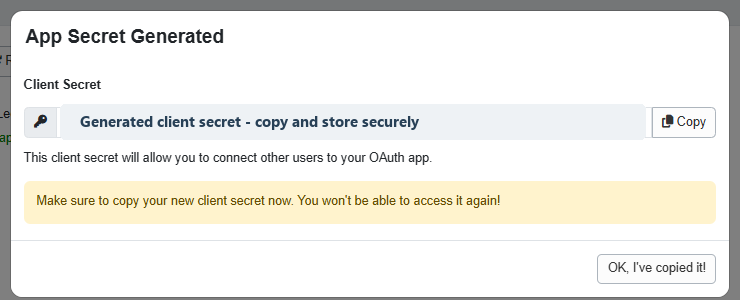
4Copy and protect the Client Secret
OwnerRez displays the Client Secret once. Copy it immediately and keep it available only until you enter it in ActionLedger.
Security requirement: never email, message, screenshot, publish, or commit this value. ActionLedger encrypts it server-side and does not return it to the browser after connection.
The guide intentionally redacts the Client Secret. Use the value generated for your own OAuth app.
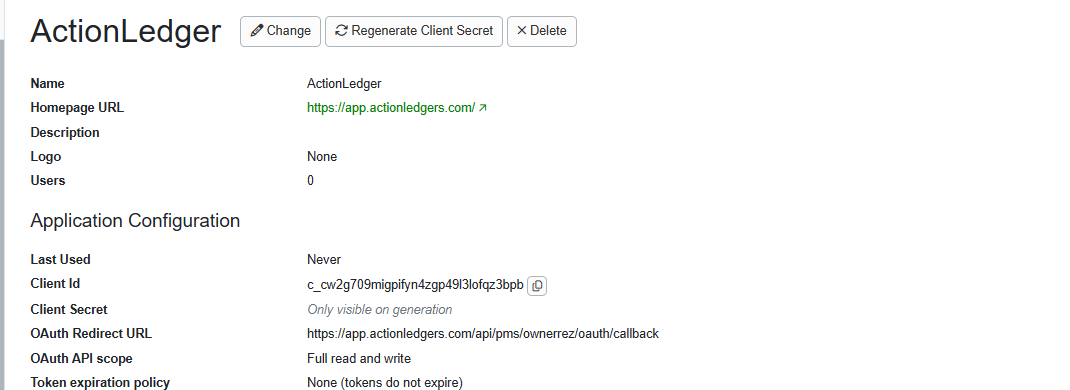
5Copy the Client ID
On the saved OAuth app page, copy the Client ID. You will enter the Client ID and Client Secret together in ActionLedger.
Copy the Client ID from the OwnerRez application configuration.
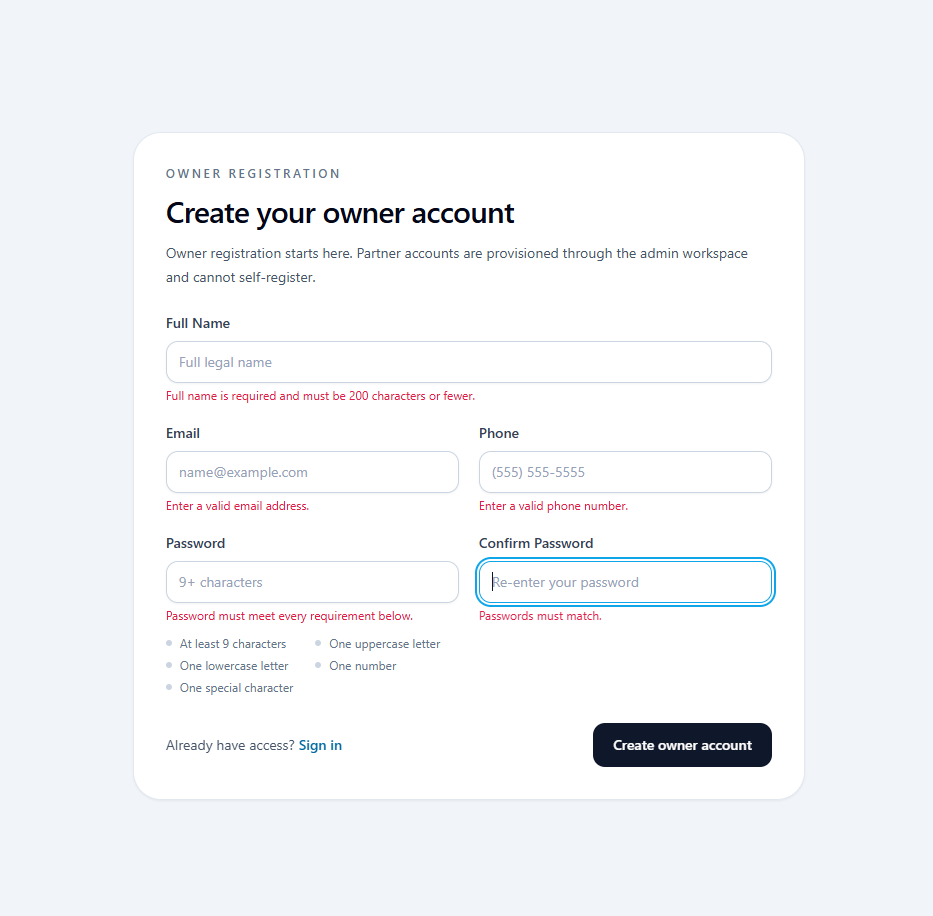
Use a password with at least nine characters, including an uppercase letter, lowercase letter, number, and special character, as shown on the registration screen.
Enter the owner’s contact details and create the provisional account.
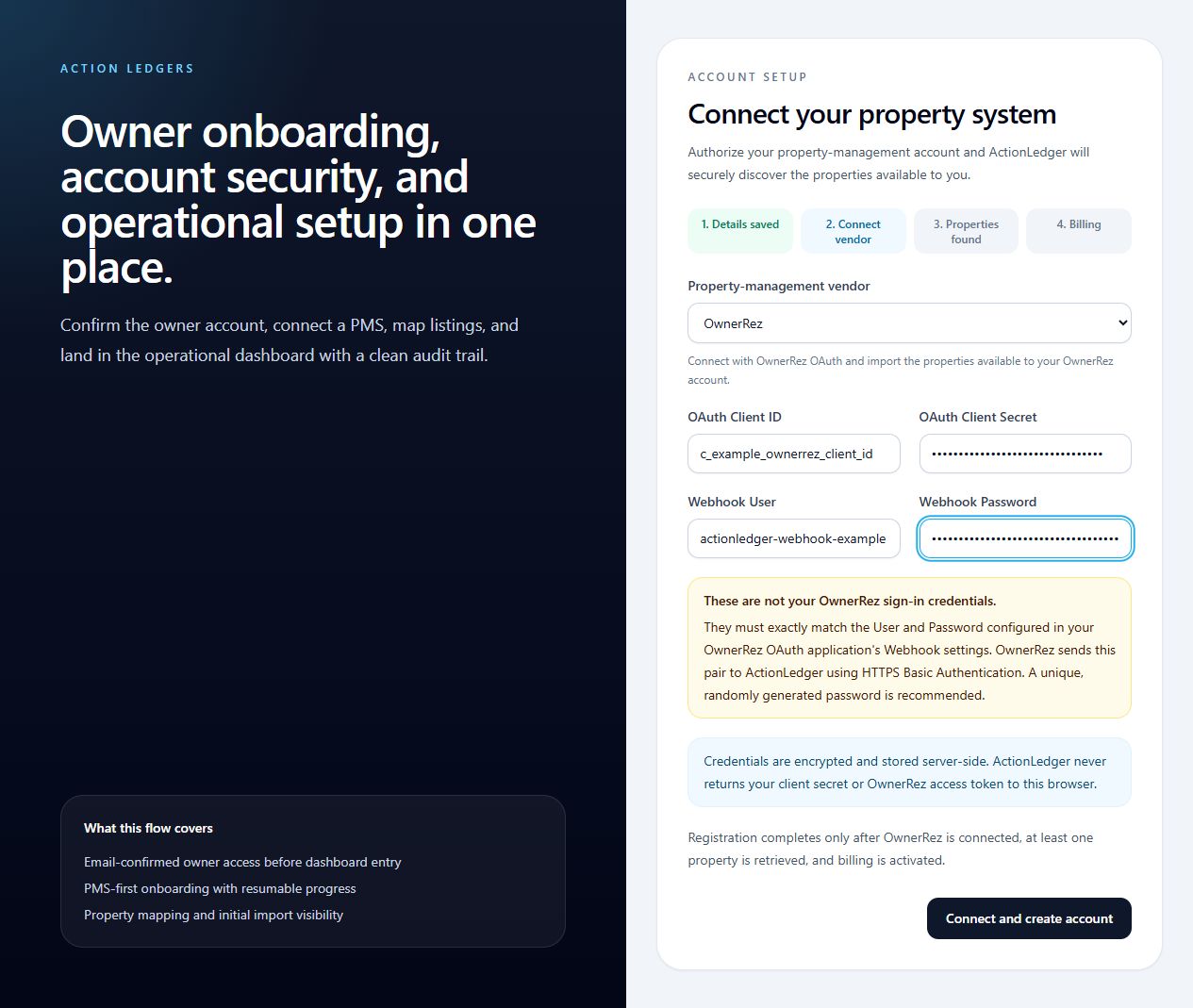
7Connect OwnerRez
Select OwnerRez and enter all four values:
OAuth Client ID and OAuth Client Secret: copy these from the saved OwnerRez OAuth app in Steps 4 and 5.
Webhook User: enter the exact value from OwnerRez Webhooks → User in Step 3.
Webhook Password: enter the exact value from OwnerRez Webhooks → Password in Step 3.
The Webhook User and Webhook Password must match OwnerRez exactly. Then select Connect and create account.
Do not enter your OwnerRez sign-in username or password. OAuth Client ID/Secret authorize API access. Webhook User/Password are a separate HTTP Basic pair used only when OwnerRez sends webhook notifications to ActionLedger.
Enter the same Webhook User and Webhook Password you created in OwnerRez. The screenshot uses synthetic examples; credentials are encrypted and stored server-side.
8Authorize ActionLedger
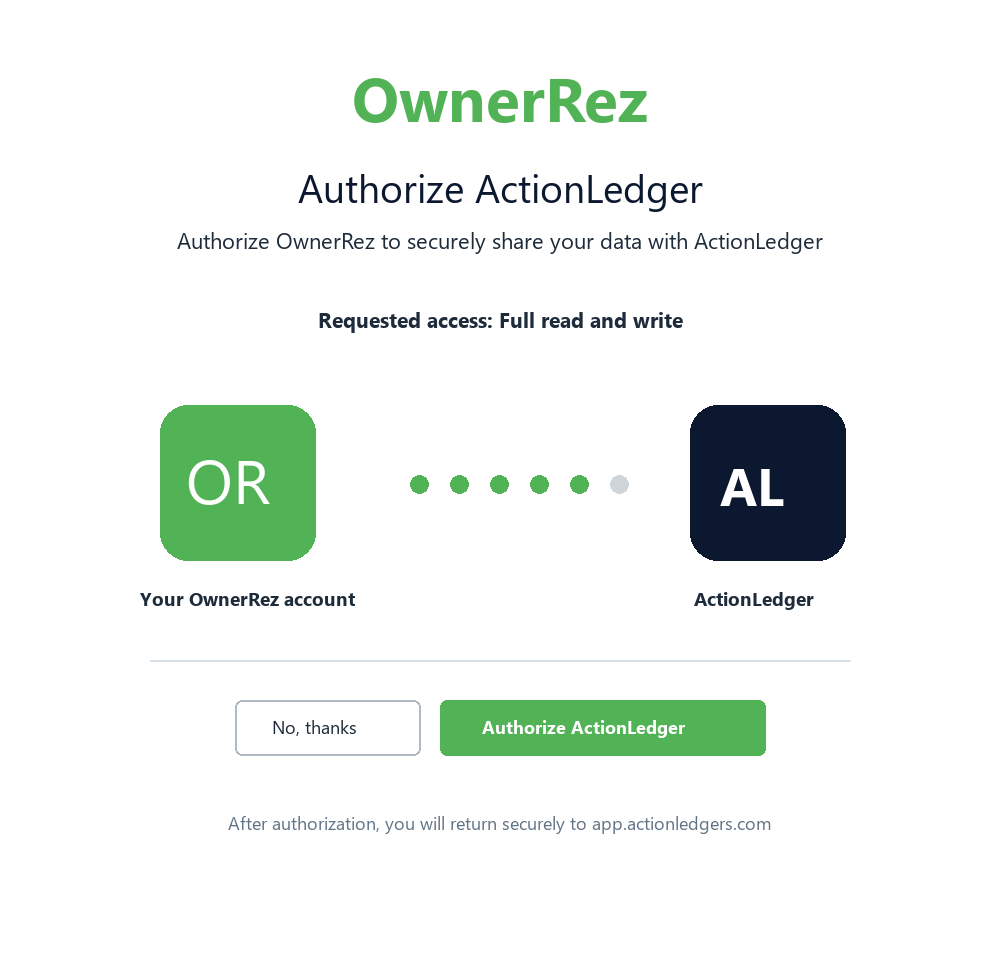
OwnerRez opens its authorization page. Confirm that the application name is ActionLedger, review the requested access, and select Authorize ActionLedger.
After authorization, OwnerRez returns you to app.actionledgers.com. If authorization fails, verify the exact callback URL from Step 3 before creating another app.
Authorization is completed on OwnerRez’s hosted page.
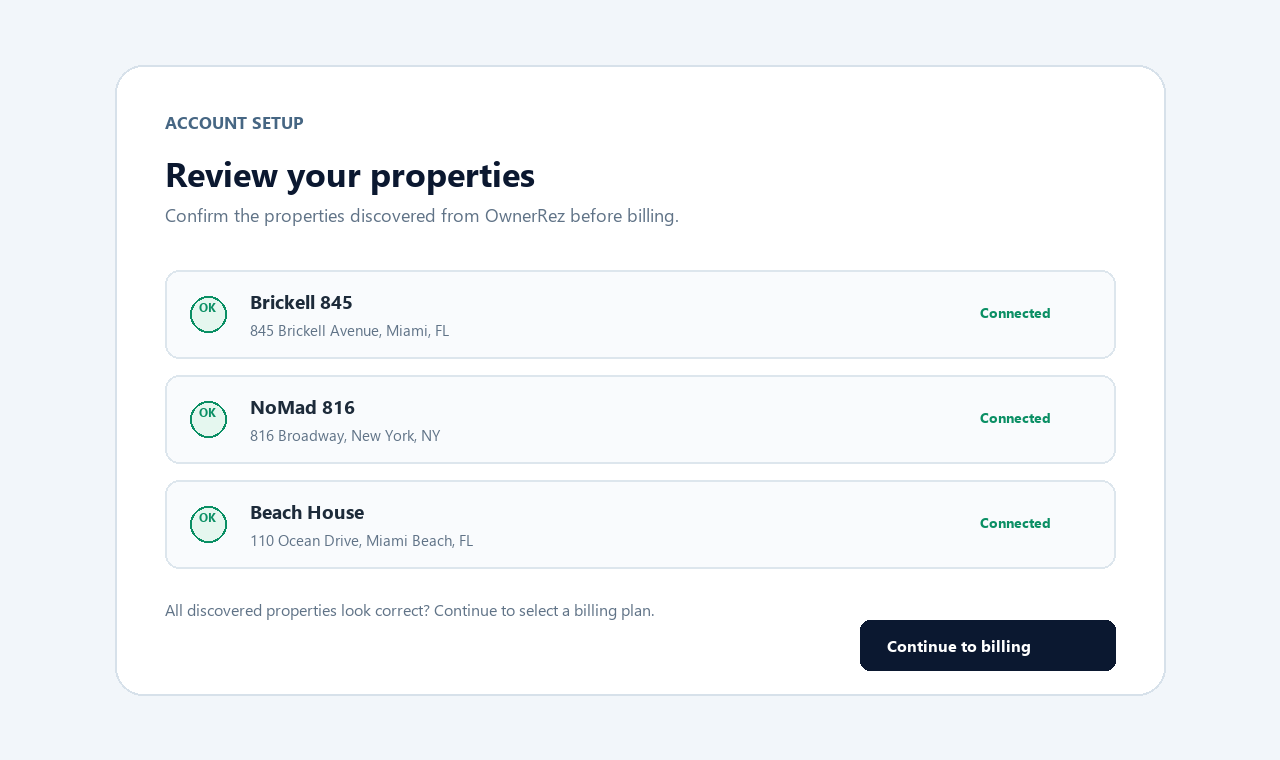
9Review discovered properties
Confirm the discovered property names and addresses. If a property is missing, verify that the OwnerRez user who authorized ActionLedger can access it. Select Continue to billing when the list is correct.
Review the properties retrieved from the authorized OwnerRez account.
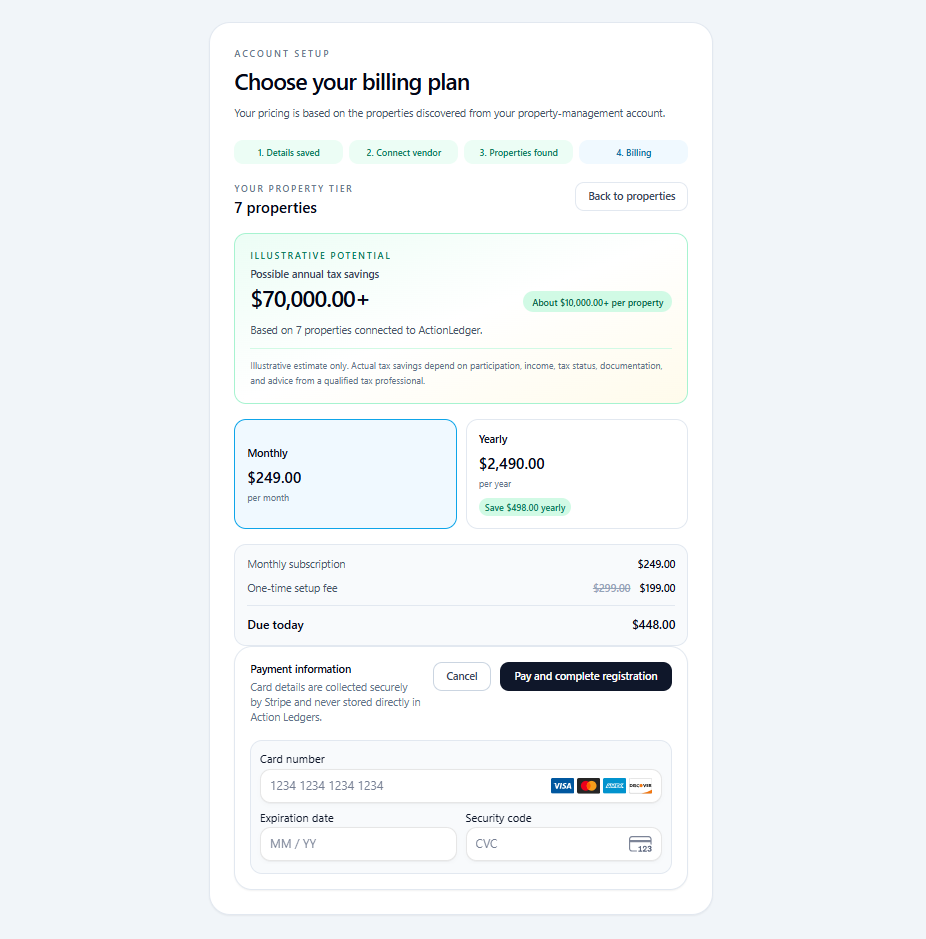
10Choose billing and complete registration
Review the property tier, one-time setup fee, monthly or yearly subscription, and amount due today. Enter payment details in the secure Stripe form, then select Pay and complete registration.
After payment succeeds, ActionLedger activates the owner account and begins onboarding and initial data synchronization.
Registration completes only after successful payment.
Final verification checklist
OAuth app name is ActionLedger.
The production callback and webhook URLs exactly match Step 3.
Booking, Guest, Inquiry, Message, Property, and Quote are selected.
OwnerRez authorization completed successfully.
At least one property was discovered and reviewed.
Payment and registration completed successfully.
Common issues
redirect_uri_mismatchUse the exact OAuth Redirect URL from Step 3, including https:// and the full path.
Authorization rejectedRestart the connection and approve ActionLedger on OwnerRez’s authorization page.
No properties foundVerify that the authorizing OwnerRez user can view the expected properties.
Payment did not completeUse a valid payment method. Account activation waits for successful payment.
Need help? Contact ActionLedger support with the owner email, approximate time, and visible error message. Never include the OwnerRez Client Secret.
After registration: initial synchronization
After successful payment, confirm that the OwnerRez connection status is Connected.
Review the discovered OwnerRez properties and their ActionLedger mappings.
Do not accept an ambiguous mapping; escalate it for review.
Allow the initial synchronization to import the configured lookback period.
Review the per-entity synchronization results and retry a failed entity type after correcting its permission or mapping issue.
The standard initial lookback is 365 days. An administrator can configure a different lookback for a property. A separate historical import can be used when the regular sync does not provide the required period or entity coverage.
What you see in ActionLedger
After a successful connection, ActionLedger displays the connected OwnerRez account, mapped properties, connection health, last synchronization time, and per-entity synchronization status.
Imported activity is normalized into property-specific records and routed to the appropriate owner-review workflow. Repeated API records and repeated webhook deliveries are deduplicated so the same source fact is not treated as a new owner activity each time it is received.
Sync timing
OwnerRez webhooks are the primary near-real-time update path for supported entity types.
A reconciliation scheduler checks for due PMS sync work every five minutes.
Default property polling intervals are 60 minutes for messages, 360 minutes for reservations, and 720 minutes for calendar/availability work; administrators can configure different intervals.
Manual sync runs a full configured-lookback reconciliation for the mapped properties.
These are processing intervals, not a contractual delivery SLA. Provider throttling, unavailable permissions, an unmapped property, or downstream retries can delay visibility.
What data is transmitted from OwnerRez to ActionLedger
Availability depends on the permissions OwnerRez grants to the OAuth app and the capabilities enabled for each mapped property.
Account and connection information
OwnerRez account/user identifier.
Account display name when returned by OwnerRez.
OAuth token type and granted scope.
Connection status, authorization time, validation time, and last sync time.
OAuth client secrets and access tokens are stored through ActionLedger's secret-store abstraction and are not displayed in this article, screenshots, or normal application logs.
Properties
OwnerRez property identifier.
Property name and external/display name.
Address lines, city, state/region, postal code, and country.
Time zone and currency.
Property type.
Bedroom, bathroom, and maximum-guest counts.
Public/listing URL and primary image URL when available.
Latitude and longitude when available.
Source-created and source-updated timestamps.
Listings
OwnerRez listing identifier and linked property identifier.
Listing name.
Listing URL and image URL when available.
Listing status and currency.
Source-created and source-updated timestamps.
Listing API access may require OwnerRez partner approval. See the common-issues section of OwnerRez OAuth Apps.
Reservations and blocks
Booking/block identifier and linked property/listing identifiers.
Booking status and whether the record is a block.
Arrival, departure, booking, created, and updated timestamps.
Total amount, total amount owed, and currency when provided.
Total guest count and adult, child, infant, and pet counts.
Related quote identifier and booking/listing source when provided.
Guest identifier, full name, first name, last name, email address, and phone number when provided.
Calendar availability used by ActionLedger is derived from OwnerRez booking and block date ranges. ActionLedger does not currently import OwnerRez pricing history.
Guest communication
Message and conversation/thread identifiers.
Linked property, booking, and guest identifiers when provided.
Sender role/display information and inbound/outbound direction.
Message channel and sent timestamp when provided.
Draft and removed status.
Message content received through live webhooks.
Raw webhook/API payload hash and a private storage reference used for traceability.
Historical API message retrieval is limited to threads discoverable from bookings in the requested date range. OwnerRez does not provide an endpoint that returns every historical thread for an account; OwnerRez recommends using message webhooks for forward-looking coverage. See OwnerRez Sandbox Messaging.
Messaging access for a distributed OAuth application requires an OwnerRez partnership agreement. Self-use access can be granted for development.
Inquiries
Inquiry identifier and linked property identifier.
Inquiry status.
Created and updated timestamps.
Guest identifier, name, email address, and phone number when provided.
Inquiries are received through webhooks and are included in the default historical-import scope. They are not currently pulled by the regular manual initial-sync loop.
Quotes
Quote identifier and linked property identifier.
Quote status.
Amount and currency when provided.
Created and updated timestamps.
Quotes are received through webhooks and are included in the default historical-import scope. They are not currently pulled by the regular manual initial-sync loop.
Tasks
Task identifier and linked property/listing identifiers.
Title and description.
Status and assignee.
Due and completed timestamps.
Created and updated timestamps.
Tasks are pulled by the regular sync. ActionLedger can accept task webhook payloads if OwnerRez emits them, but the current public OwnerRez webhook documentation does not list task as a configurable entity type.
Reviews and payments
The backend has read adapters for reviews and payment summaries, but they are not enabled in the standard OwnerRez property mapping or regular sync configuration. They must not be represented as part of the default production sync.
When explicitly enabled for a controlled historical import:
Reviews can include the review identifier, reviewer name, rating, timestamps, and a redacted normalized body.
Payment summaries can include the payment identifier, amount, currency, status, type, and timestamps.
No bank-account number, full card number, card security code, or payment credential is intentionally mapped into the normalized payment model.
Historical import scope
The default OwnerRez API historical-import scope is:
Properties.
Listings.
Reservations/bookings.
Messages from booking-discoverable threads.
Inquiries.
Quotes.
Reviews, payments, and tasks are optional explicit historical-import categories and depend on the enabled property capabilities and OwnerRez permissions.
What data is transmitted from ActionLedger to OwnerRez
Current data-write behavior
ActionLedger does not write OwnerRez business data by default in the current release.
The production OAuth app uses the approved Full read and write scope, while ActionLedger keeps business-data write operations disabled by default.
Standard OwnerRez property mappings have AllowPmsWrites disabled.
No bookings, blocks, properties, listings, inquiries, quotes, tasks, payments, or reviews are created or changed in OwnerRez.
Implemented but not enabled
The backend contains guarded support for the following future write-back operations:
Send an individual guest message through POST /v2/messages.
Change a nightly spot rate through PATCH /v2/spotrates.
Change a minimum-stay value through PATCH /v2/spotrates.
These operations require a Full-scope OwnerRez app, a writable property mapping, the corresponding capability, an explicit owner approval, guardrail validation, and a separate execution step. They are not enabled in the current release and should not be represented as active functionality.
Does ActionLedger use webhooks?
Yes. ActionLedger uses OwnerRez webhooks for near-real-time changes. The production webhook URL is configured directly on the OwnerRez OAuth app, and deliveries are accepted for the event types selected during setup.
Webhook endpoint
POST https://app.actionledgers.com/api/webhooks/pms/ownerrez
Webhook actions handled
webhook_test — accepted as a connectivity test; no business activity is created.
entity_create — creates a new normalized event when the entity type is supported.
entity_update — creates an updated normalized event; canceled bookings are recognized as cancellations.
entity_delete — records a booking/block deletion when applicable.
application_authorization_revoked — revokes/disables the saved OwnerRez connection so future reads and writes stop.
Webhook entity types handled
booking.
thread_message.
inquiry.
quote.
property.
task, if emitted by OwnerRez.
api_application for authorization-revoked and test events.
Unknown entity types and unsupported/draft events are retained as delivery receipts where applicable but do not create normal owner activity.
Expected webhook behavior
ActionLedger returns HTTP 204 No Content after accepting a valid test or supported delivery.
For non-test deliveries, the raw JSON is hashed and stored privately before downstream processing. A webhook_test is acknowledged without creating a stored business event.
Duplicate deliveries are detected and do not create duplicate canonical activity.
A supported delivery that arrives before its property mapping is ready is retried.
Downstream processing defaults to eight attempts with exponential delay beginning at 30 seconds and capped at 60 minutes; exhausted events are dead-lettered for operational review.
OwnerRez expects a 2xx response, waits approximately two seconds for acknowledgement, and may retry failed webhooks up to ten times with exponential backoff. See OwnerRez Webhooks.
Disconnecting OwnerRez
In ActionLedger, open Integrations > OwnerRez.
Select Disconnect OwnerRez and confirm.
In OwnerRez, revoke the ActionLedger application if it is still listed under authorized applications.
Confirm that the ActionLedger connection displays Revoked or Disconnected and that mapped properties are disabled.
Disconnecting stops future synchronization. Historical evidence and audit records already created in ActionLedger are handled according to the applicable retention and deletion policy; disconnection alone should not be described as immediate deletion of all historical records.
Support
ActionLedger integration support: info@actionledgers.com OwnerRez API and partnership questions: partnerhelp@ownerrez.com
When reporting an issue, include the test environment, approximate UTC time, OwnerRez entity ID, ActionLedger property ID, and observed HTTP/status result. Do not include OAuth tokens, client secrets, passwords, or unnecessary guest message content.